
🎄 Festive Rush - Deliveries might take a bit longer. We appreciate your patience.
Festive Period 2025
Cut-Off Times


Australian e-commerce fulfilment costs have increased steadily in recent years, with delivery pricing now varying significantly based on parcel size, destination, and carrier pricing models. Shopify shipping rates in Australia are a recurring pain point for many local merchants, with sellers frequently reporting that checkout pricing fails to cover actual delivery costs.
One seller even had a situation where a $12.50 checkout charge failed to cover a $13.80 delivery cost, creating uncertainty around how shipping should actually be configured.
In most cases, profit loss is not caused by shipping complexity itself, but by rate setups that fail to reflect how Australian carriers price deliveries for weight, space, and destination.
This guide walks through how to set Shopify shipping rates in Australia without losing profit, focusing on the correct setup inside Shopify before optimisation or integrations come into play.
Add carrier-calculated shipping rates to your Shopify store through Couriers & Freight.
Get a Quote NowShopify shipping rates in Australia decide what customers see and pay for delivery at checkout. These rates are configured inside your Shopify admin and apply when a customer enters an Australian delivery address.
Most Australian stores use one of three shipping rate types based on how their products ship. If products are similar in size and weight, simpler setups can work. If orders vary in size or frequently ship outside metro areas, shipping costs can change significantly and require a more accurate configuration.
Shopify lets you choose from three shipping rate types:
These rate types form the foundation of Shopify shipping rates setup in Australia, and the sections below explain how each works and how to configure them step by step.
Shopify determines shipping prices using the configuration entered in your admin settings. These settings control which delivery options appear to customers and how shipping charges change as cart contents or delivery locations change.
Shopify relies on three inputs to generate shipping prices:
Product weights are pulled from each product or variant. Shipping zones group delivery destinations such as Australia-wide or state-based regions. Rate rules connect pricing conditions to those zones.
When a customer reaches checkout, Shopify totals the weight of all items in the cart and matches the delivery address to the correct zone before applying the relevant rate rule.
Most Australian stores create domestic shipping zones covering all states or split zones between metro and regional deliveries. Once configured, Shopify repeats this same decision process automatically for every order placed.
Shopify relies on accurate product weights and clearly structured zones to determine which shipping rules apply. Product weights are entered at the product or variant level and directly influence Shopify shipping rates by weight when weight-based rules are enabled.
Shipping zones group destinations together, allowing store owners to apply pricing conditions across defined delivery regions.
When customers purchase more than one product, Shopify combines item weights and treats the cart as a single shipment.
Flat rates apply once per order, regardless of item quantity, while weight-based rules adjust pricing according to combined cart weight. This is especially important when configuring Shopify shipping rates for multiple items, where incorrect weight ranges can cause checkout under-charging.
Shopify only uses physical weight to calculate shipping, ignoring cubic or volumetric weight. Since Australian carriers often charge based on the space a parcel occupies, this can result in checkout prices that underestimate the true delivery cost for bulky items.
For example, a lightweight flat-pack furniture item may weigh only 8kg but occupy the same space as a 20kg shipment. Shopify may price the delivery using physical weight, while carriers charge based on the space taken inside the vehicle.
Because of this mismatch, bulky products often generate checkout prices that differ from actual carrier costs.

This section outlines the sequential steps store owners follow inside the Shopify admin to configure shipping rates correctly. Each step focuses on configuration rather than pricing strategy.
Most merchants complete this setup in under an hour, but accuracy at this stage determines whether checkout pricing remains sustainable as order volumes grow.
Navigate to each product in Shopify and enter accurate weights at the product or variant level. Weights should be applied consistently across the catalogue.
Accurate weights prevent unexpected price jumps when customers add multiple items to their cart.
Within shipping settings, create domestic zones covering Australian delivery destinations. Businesses may use one national zone or multiple zones reflecting delivery regions.
Zone structure determines how Shopify applies delivery pricing across metropolitan and regional orders.
After creating a shipping zone, Shopify prompts store owners to select a shipping rate type for that zone. Available options include flat rates, weight-based rates, and carrier-calculated rates.
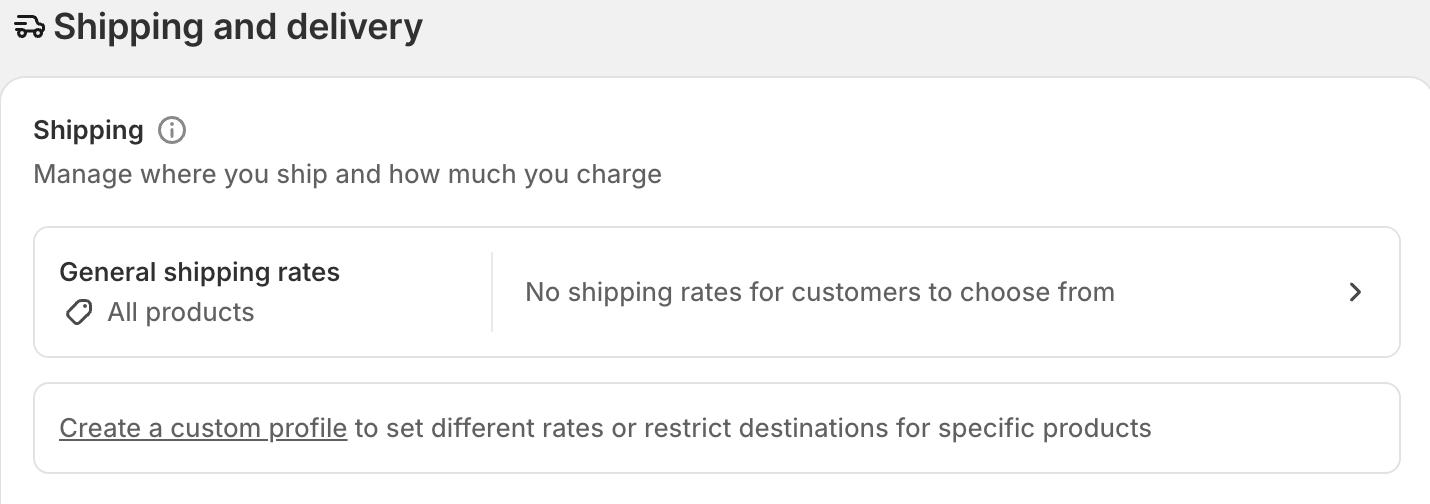
This selection controls how shipping prices are generated at checkout, based on the rules configured for the chosen rate type.
Flat and weight-based rates are added directly inside shipping zones by entering pricing conditions and weight ranges.
Many stores initially choose flat rates because they work across all Shopify plans, but these rules require careful weight ranges once orders begin containing mixed or heavier products.
Carrier-calculated rates are available on Shopify plans that support live carrier pricing. When enabled, Shopify retrieves real-time shipping prices from connected carriers and displays them automatically at checkout.

Enabling this setting allows Shopify to display dynamically calculated rates based on shipment details and prepares the store for carrier-integrated rate retrieval.
Flat shipping rates apply a fixed delivery charge when rate conditions are met. The checkout price remains unchanged regardless of cart variation within that zone.
Carrier-calculated rates work differently. Shopify sends shipment details such as total weight and destination to connected carriers, and displays returned pricing instantly.
In practical terms, flat rates prioritise simplicity, while live rates adjust automatically when customers add items, change quantities, or enter regional delivery addresses.
Shopify plan access determines whether live rates are available, while flat rates remain accessible across plans.
Many Shopify merchants move to carrier-calculated rates once order sizes diversify, delivery locations expand nationally, or bulky products begin affecting checkout accuracy.
When enabled, Shopify sends order details such as weight and delivery location to an integrated shipping platform. That platform retrieves carrier pricing and returns delivery options to checkout in real time.
Shopify supports this functionality through third-party integrations. Couriers & Freight is a platform connecting Shopify stores with multiple Australian carriers through a single integration.
Instead of relying on estimated shipping values, checkout pricing reflects actual carrier calculations based on the shipment being ordered. Merchants can view integration details on the Couriers & Freight Shopify app.
Couriers & Freight integrates directly with Shopify to return carrier-calculated shipping rates using real shipment data.
When customers reach checkout, Shopify sends shipment details such as weight, destination, and service requirements to the platform, which retrieves live pricing from connected Australian carriers.
This setup is particularly useful for merchants shipping bulky items, mixed-weight carts, or orders across varied domestic delivery zones.
Automatic pricing updates at checkout help merchants avoid undercharging and reduce the need for manual rate adjustments, especially for larger or regional orders. Once Shopify is correctly configured, stores can display carrier-accurate shipping rates without affecting the customer experience.
Download Couriers & Freight’s Shopify App to enable live, carrier-calculated shipping rates at checkout.
Add carrier-calculated shipping rates to your Shopify store through Couriers & Freight.
Get a Quote Now


MHP

No Surcharge*

$16.50
$14
$15.50
$0
$15.50
$14.75
$0
$0
$0
$0
MHP Large Item
No Surcharge*
$16.50
$75
$62
$62
$60.10
$14.75
$0
$0
$0
$0
Residential Pickup
No Surcharge*
$6
$0
$9
--
$9
$10.60
$0
$0
$0
$38.50
Reidential pick up 30-99kgs
No Surcharge*
$63
$0
$9
$0
$9
$74.15
$20
Won't carry
Won't carry
$38.50
Residential pick up 100kgs+
No Surcharge*
$198
$0
$9
$0
$9
$158.87
$50
Won't carry
Won't carry
$38.50
Residential Delivery up to 29kgs
No Surcharge*
$6
$0
$9
--
$9.00
$10.60
$0
$0
$0
$38.50
Residential Delivery up 30-99kgs
No Surcharge*
$63
$0
$9
$0
$9
$74.15
$20
Won't carry
Won't carry
$38.50
Residential Delivery 100kgs+
No Surcharge*
$198
$0
$9
--
$9
$158.57
$50
Won't carry
Won't carry
$38.50
Tail Lift Pick up 50-99kgs Sydney / Melbourne
No Surcharge*
$45
$50-$250
$88
$88
$88
$44.07
$120
Won't carry
Won't carry
$61.50
Tail Lift Pick up 100-299kgs Sydney / Melbourne
No Surcharge*
$85
$50-$250
$88
$88
$88
$44.07
$120
Won't carry
Won't carry
$61.50
Tail Lift Pick up 300-499kgs Sydney / Melbourne
No Surcharge*
$120
$50-$250
$88
$88
$88
$44.07
$120
Won't carry
Won't carry
$61.50
Tail Lift Pick up 500kgs + Sydney / Melbourne
No Surcharge*
$250
$50-$250
$88
$88
$88
$44.07
$120
Won't carry
Won't carry
$61.50
Tail Lift Delivery 50-99kgs Sydney / Melbourne
No Surcharge*
$45
$50-$250
$88
$88
$88
$44.07
$120
Won't carry
Won't carry
$61.50
Tail Lift Delivery 100-299kgs Sydney / Melbourne
No Surcharge*
$85
$50-$250
$88
$88
$88
$44.07
$120
Won't carry
Won't carry
$61.50
Tail Lift Delivery300-499kgs Sydney / Melbourne
No Surcharge*
$120
$50-$250
$88
$88
$88
$44.07
$120
Won't carry
Won't carry
$61.50
Tail Lift Delivery 500kgs + Sydney / Melbourne
No Surcharge*
$250
$50-$250
$88
$88
$88
$44.07
$120
Won't carry
Won't carry
$61.50
Dead weight over 32KGS carton freight
No Surcharge*
$16.50
$75
$70
$70
$70
$14.75
$0
Won't carry
Won't carry
$0
Oversize Surcharge 1.20 - 1.54
No Surcharge*
--
$0
$0
$0
$0
$5.40
$10
$15
Won't carry
$0
Oversize Surcharge 1.55 - 1.85
No Surcharge*
$17
$20
$0
$0
$0
$11.93
$10
$15
Won't carry
$0
Oversize Surcharge 1.86 - 2.20
No Surcharge*
$37
$40
$0
$0
$0
$11.93
$10
Won't carry
Won't carry
$0
Pallet Surcharge
No Surcharge*
--
$0
$0
$0
$0
$0
$0
Won't carry
Won't carry
$0
Hand Unload Fee Carton
No Surcharge*
--
$0
$70
$70
$70
$47
$0
Won't carry
Won't carry
$61.50
Western Australia Regional Surcharge
No Surcharge*
%10
$0
$0
$0
$0
$0
$0
$0
$0
$0
*Surcharges may apply to areas/deimensions not listed
**Prices correct of 16th September 2024

Click to start shipping in less than 60 seconds